Unlocked Padlock color filled icon


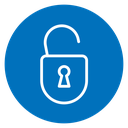
Outline padlock icon with a plain body, keyhole, and shackle swung fully open
About the Unlocked Padlock color filled icon
This icon shows a padlock with a plain rectangular body, a round keyhole, and its shackle rotated fully open to rest beside the body. It represents unlocked access, disabled security, and open permissions. Use it in login screens, account security settings, privacy toggles, app permission states, or password managers.
The shackle forms a wide open loop attached only at the left post, contrasting with a closed padlock's tight arc. It pairs well with locked-padlock, key, and shield icons in the library for showing security state changes. Use it beside a locked version to indicate toggled access.
This is the colour filled version of the unlocked padlock icon: a flat, solid-colour shape that stands out in dashboards, marketing pages and app tiles where the icon needs to carry colour meaning.
Get it free as an SVG vector or transparent PNG (16-512px), copy the SVG code, or restyle it in the free online editor — recolor any part, add gold, neon or gradient effects, animate it, or export EPS, PDF and DXF.
Free for personal and commercial use with attribution.