Keypad black filled icon


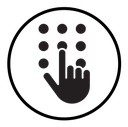
Outline hand pressing one of six round buttons inside a circular frame
About the Keypad black filled icon
Inside a thin circular badge, six round buttons sit in a two-column grid while an outstretched hand reaches up with its index finger extended to press one of them. The gesture reads as entering a code or PIN rather than simply viewing a pad. Useful for smart lock and access control screens, ATM and POS interfaces, two-factor authentication flows, intercom product pages, and security training slides.
The enclosing circle gives the mark a badge silhouette that works in toolbars and app tiles, and the finger overlaps the button grid so the pressing action stays obvious. Uniform stroke keeps hand and buttons visually equal. Pair it with padlock, fingerprint, and door icons; use at 40px or larger so the buttons do not merge.
This is the solid black filled version of the keypad icon: a bold silhouette that reads clearly at 16-24 px and on dark or busy backgrounds, and prints well in one colour.
Get it free as an SVG vector or transparent PNG (16-512px), copy the SVG code, or restyle it in the free online editor — recolor any part, add gold, neon or gradient effects, animate it, or export EPS, PDF and DXF.
Free for personal and commercial use with attribution.